From scattered content to a connected workspace.
Designing Module Hub to bring documentation, ownership, and delivery into one place within a CRM.
Client
Alpha Bravo Development Agency
My Role
Product Designer
Duration
Mar 2026 - Dec 2025
Team
Product Designer, Founders, CPO, Engineers

Context
A feature is more than its documentation.
A feature moves through requirements, design, delivery, and validation. Along the way, it accumulates documents, supporting files, tasks, and decisions.
I designed Module Hub as a shared workspace for this content inside the CRM. Each module gives business analysts, product designers, and their collaborators a place to organize the work around a feature—not just store its documents.
Context
What is this feature, and who owns it?
Content
Where are its documents, & files?
Execution
What happens next and who its assigned to?
Problem
Finding a document is only part of finding the answer.
A document can explain a requirement without showing who is responsible for it. A task can describe the next step without carrying the reasoning behind it. A user story can capture expected behavior without making its supporting material easy to find.
The design challenge was to bring these pieces together without turning the workspace into one long, undifferentiated collection of content.

THE DESIGN CHALLENGE
Give every feature a clear home, while keeping its content, ownership, and next steps connected?
Design Direction
One module. Different kinds of work.
I made the module the organizing unit, with a consistent structure around it. At the project level, teams can browse modules and identify responsibilities. Inside a module, persistent details establish context, while dedicated sections organize the work.
The structure keeps individual items connected to the feature they support, while giving each type of work an appropriate space.

Module Overview
Scan the portfolio before opening the details.
The overview brings module names, descriptions, assigned business analysts and product designers, and dates into a single table.
Search, sorting, and filtering support finding a specific module. The list and board options provide alternative ways to navigate the collection, while contextual actions keep editing, approval, and sprint linking close to the relevant item.
DESIGN PRINCIPLE
Enough information to identify the right module. Not everything inside it.
Workspace structure
Flexible sections, familiar patterns.
Different features need different supporting material. I designed an add-section flow around four section types:
Documents
Written content and working documents.
Drive
Supporting files, folders, and shared assets.
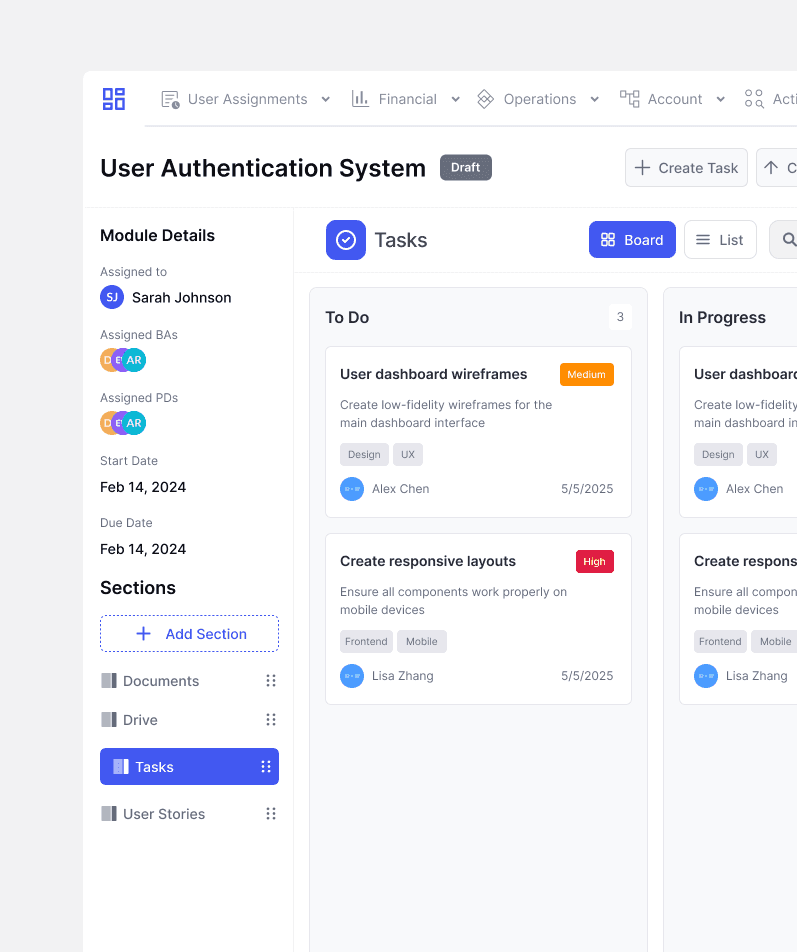
Tasks
Actionable work with ownership and priority.
User Stories
Requirements and their associated test cases.
Teams can name sections to suit their work while retaining recognizable content types. The module details remain visible as users move between sections, preserving a consistent point of reference.

Document Creation
Establish context before creating content.
Creating a document involves more than choosing a blank page. Its location, audience, starting structure, and collaborators all matter. I organized document creation into four steps:

01
Confirm the context

Show the project, module, and section where the document belongs.
02
Choose its visibility

Distinguish internal working material from content intended for clients or external stakeholders.
03
Select a template

Offer starting points such as requirements documents, meeting notes, & specifications.
04
Choose collaborators

Identify the team members the document should be shared with.
WHY THIS SEQUENCE
Separate the decisions. Keep the flow moving.
The sequence avoids one dense form and makes organization and sharing part of creation—not something to resolve afterward.
Content Management
Make returning to work as clear as starting it.
The Documents section combines creation options with recent content. Users can start from a blank document or template, then return to existing material through search, ownership filters, and list or board views.
Drive provides a separate space for folders and supporting files, keeping file storage distinct from document authoring.

From a working document to a reusable starting point.
The document editor carries the same module context forward, alongside save status, sharing, and a “Save as Template” action. That creates a path from individual content to a reusable starting point.

Connected Execution
Keep the next step beside the information that explains it.
Module Hub extends beyond content storage into the work that content generates. Tasks can be viewed as a board for progress or as a list for comparing details such as priority, assignee, and due date.

Traceability
Carry the requirement through to validation.
The User Stories section connects a module to its user stories, test cases, and test steps. The expandable hierarchy lets users move from a story into its validation details, including expected results and test status, without treating each level as an unrelated record.
Alongside this, module status, submission for approval, and activity history make review and changes visible within the workspace.

Outcomes & Reflection
A shared home for the feature, not another folder.
The resulting design brings feature content and delivery activities into a single module-centered workspace. Its value lies in the connections:
— Documents retain their project and module context.
— Ownership stays visible across sections.
— Tasks sit alongside the information that supports them.
— User stories connect requirements to validation.
— Review actions remain accessible at the module level.
A key lesson from this design was that centralization alone is not enough. Putting everything in one place only helps when people can understand how the pieces relate.
What I would validate next
Finding the right information
Can users locate a requirement or supporting file without being told which section contains it?
Understanding visibility
Do users understand the distinction between internal and external documents, and how that relates to collaborator selection?
Moving from content to action
Can users create a task or link a user story while maintaining a clear understanding of its parent module?
Navigating complexity
Does the section structure remain understandable as modules accumulate more content?
THE TAKEAWAY
The goal wasn’t simply to store more content in the CRM. It was to keep the reasoning, responsibility, and work around a feature connected.